



-
Home

-
Maintenance Kit Instructions
-
HP LaserJet 4000
- HP LaserJet 4000 fuser installation instructions
HP LaserJet 4000 fuser installation instructions

Installing the fuser.
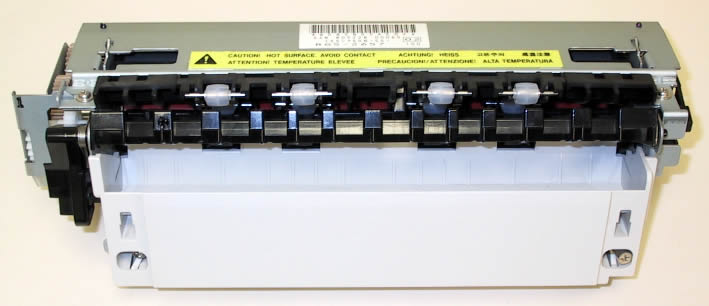
Turn the printer off and unplug the power cord. The fuser might be hot if you have been using the printer. As a safety precaution wait 30 minutes for the fuser to cool before proceeding.
If a duplexer is installed, remove it from the back of the printer. If a duplexer is not installed then remove the two plastic duplexer connector covers shown below. Pull the bottom edge out first.
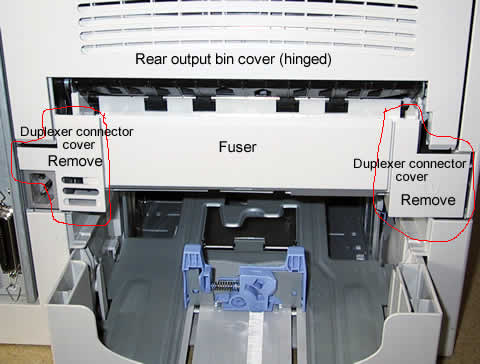
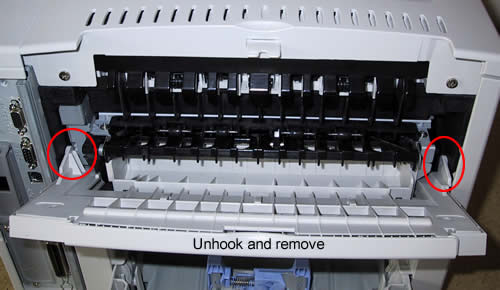
Next, lower the rear output bin cover as shown below. Flex the plastic output bin slightly to remove one side of the tray at a time.
Loosen the two fuser assembly screws shown below, pull the fuser straight out.
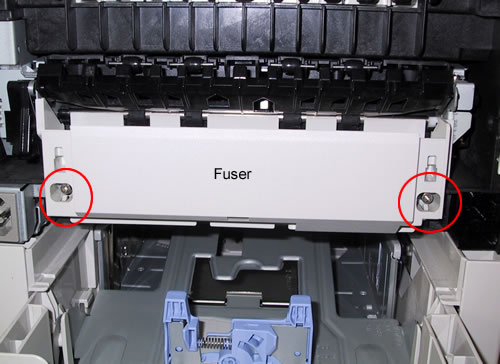
Install the replacement fuser by inserting it and aligning the left side first. Tighten the two screws and replace the rear output bin and duplexer covers.
That's it for the fuser! Remember to send your fuser back to us if you purchased your maintenance kit on exchange. Ship it back in the box we sent if you still have it.
Other Steps in HP LaserJet 4000
- HP LaserJet 4000 fuser installation instructions
- HP LaserJet 4000 transfer roller installation instructions
- HP LaserJet 4000 Tray 1 pickup roller installation instructions
- HP LaserJet 4000 Tray 1 separation pad installation instructions
- HP LaserJet 4000 feed and separation roller installation instructions
- HP LaserJet 4000 D-shaped pickup roller installation instructions
- HP LaserJet 4000 reset maintenance count instructions
Tech Support
Featured Articles



