



-
Home

-
Maintenance Kit Instructions
-
HP LaserJet 4000
- HP LaserJet 4000 feed and separation roller installation instructions
HP LaserJet 4000 feed and separation roller installation instructions

Installing the feed and separation rollers.
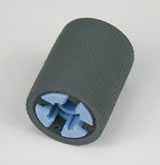
The feed rollers and separation rollers on a LaserJet 4000 are identical. Each cassette tray uses one feed roller and one separation roller. If you have one lower tray you only need two rollers. If you have a 4000T or 4050T, or a 4000 model with an optional cassette installed, then you will need four rollers.
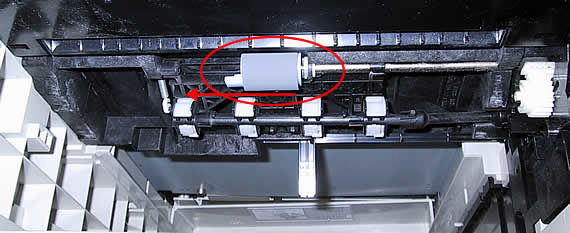
Pull the trays out of the printer and look up into the printer. You should see the roller circled in red below. Simply pinch the tabs together on the left side of the roller and pull the roller out. Push the replacement roller in place and move on the the remaining lower cassettes (if they are installed). The rollers will install in the same manner.
Installing the separation rollers.
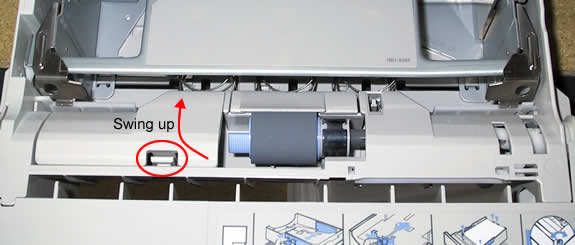
Place the paper tray in front of you and press the tab circled below forward. Then swing the hinged piece up. Pinch the two tabs on the roller and pull the roller out. Replace with a new roller and repeat this procedure for all of the installed lower trays.
Other Steps in HP LaserJet 4000
- HP LaserJet 4000 fuser installation instructions
- HP LaserJet 4000 transfer roller installation instructions
- HP LaserJet 4000 Tray 1 pickup roller installation instructions
- HP LaserJet 4000 Tray 1 separation pad installation instructions
- HP LaserJet 4000 feed and separation roller installation instructions
- HP LaserJet 4000 D-shaped pickup roller installation instructions
- HP LaserJet 4000 reset maintenance count instructions
Tech Support
Featured Articles



