Printertechs.com, Inc. refurbished HP laserjets, laser printer parts and accessoriesrefurbished HP printers and laserjet  parts

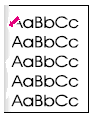
Laser printer print defects - toner smear


Problem Cause Solution How common* Comments
Toner smear Contamination in the printer 1. Print a few more pages to see if the problem corrects itself. 2. Clean the inside of the printer or use the printer’s cleaning page. 2
toner smear DC Controller is defective. The DC Controller regulates fusing roller temperature If a new Fusing Assembly does not resolve the problem, replace the DC Controller PCA 7 Do half-way test to isolate the problem.
Toner smear Defective toner cartridge Replace the toner cartridge 7 Do half-way test to isolate the problem.
toner smear Fusing Assembly is defective. The print will smear if the Fusing Assembly is not heated sufficiently to bond the toner image to the paper Replace the Fusing Assembly. See Fusing Assembly on page 306 for instructions. Try changing fuser modes depending on the type of media used 7 Do half-way test to isolate the problem.
toner smear Fusing Rollers are dirty. Toner build-up can cause the print on a page to smear Remove and inspect the Fusing Assembly for excessive toner buildup 7
Toner smear Paper might be too smooth Check the paper (or other print media) type and quality 2
Toner smear Wrong fuser setting for paper type. From the paper-handling menu on the control panel, change the fuser mode setting or choose another paper type from the printer driver
*On a scale of 1-10, how often this problem occurs (10 being most likely).
   
Products
Refurbished LaserJets
Maintenance Kits
Toner cartridges
Transfer Kits
Paper trays and cassettes
Duplexers
Envelope feeders
JetDirect Cards
Cables

Employment
Jobs

Tech Support
Main Support Page
Maintenance kit
Instructions
Manuals & Drivers
Print Defects
Repetitive defects Ruler
Error Codes
Service Mode
Clear Maint Count
Cold Reset Instr.

Tech Support Forum
Discussion Board


We buy fuser cores!
We are looking for used fusers. Click here for info.


608-831-2396
Home | Forum | Tech Support | About Us | Legal | Contact Us
 
© 2008 Printertechs.com, Inc.