



-
Home

-
Other instructions
-
HP LaserJet 4 4Plus output assembly
- HP LaserJet 4, 4Plus output assembly installation instructions , part 1
HP LaserJet 4 , 4Plus output assembly installation instructions

Side Panel Removal
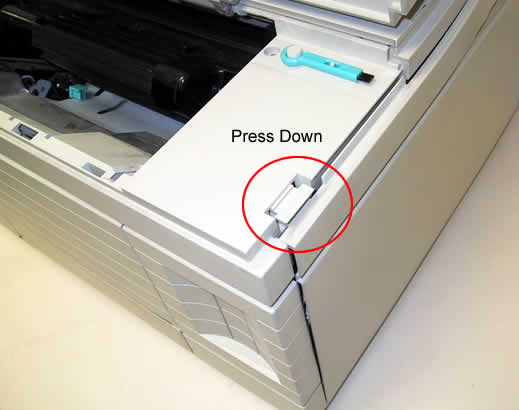
First, turn your printer off and unplug it. Facing the printer, you need to remove the right side-panel and the top panel. Open the toner access door and remove the toner. Then press down on the tab shown below to loosen the front of the side panel.
Then face the back of the printer. You will need to press down hard on the area circled below to release the back of the right side panel.
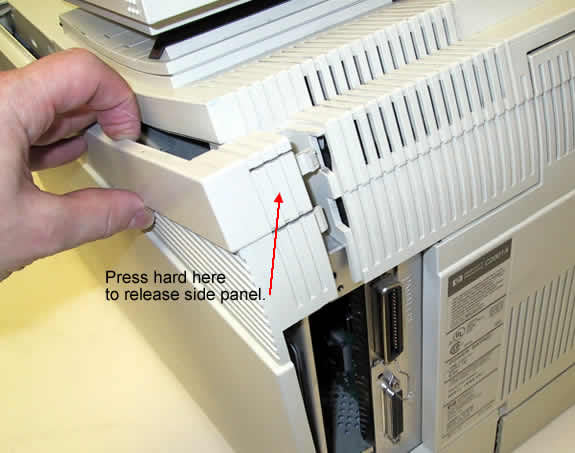
Remove the side panel.
Other Steps in HP LaserJet 4 , 4Plus output assembly
- HP LaserJet 4, 4Plus output assembly installation instructions , part 1
- HP LaserJet 4, 4Plus output assembly installation instructions , part 2
- HP LaserJet 4, 4Plus output assembly installation instructions , part 3
- HP LaserJet 4, 4Plus output assembly installation instructions , part 4
Tech Support
Featured Articles



