



-
Home

-
Troubleshooting
- 50.2 fuser error HP LaserJet 4000 4050 4100 4200 4300
Loose fuser tabs on the HP LaserJet 4000, 4050, 4100, 4200, 4300 - a potential 50.2 error
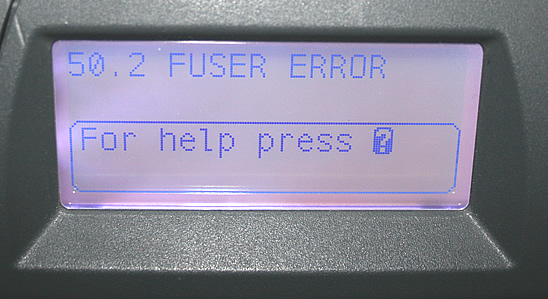
If you are experiencing a "50.2" fuser error, first turn the printer off and back on. Sometimes the error will temporarily go away with a reboot so you can print a few more pages, but usually the error reappears. If you recently moved the printer around or if you recently installed a new fuser, particularly on HP LaserJet 4000, 4050, 4100, 4200, or 4300 series printers, you should check to see if two tabs on the fuser have come loose. (They can get dislodged during shipping, heavy movement, or during fuser installation.) See more info below on these tabs.
If you have NOT recently replaced the fuser or heavily jostled the printer around, then the 50.2 Fuser error indicates you may have an actual fuser failure and the fuser needs replacing. Fusers are a consumable part and they are the main component in a printer maintenance kit; it is expected over the life of the printer you will replace the fuser / maintenance kit several times. Click here to see our list of available maintenance kits for each model printer. Most fuser models can be installed by an end user, without needing a service technician. We have installation instructions under the Tech Support section of our Web site. Call us with any questions @ 608-831-2396 or toll-free 866-352-7108.
In case you have moved the printer around recently or if you installed a replacement fuser recently -- Here are instructions for checking those fuser tabs on your LaserJet 4000, 4100, 4200, 4300, 4250, 4350 series fuser:
Turn your printer off and remove your fuser. Flip it to the gear side (the left side) and press inwards on the fuser tab to make sure it is fully clicked in place, as shown below.
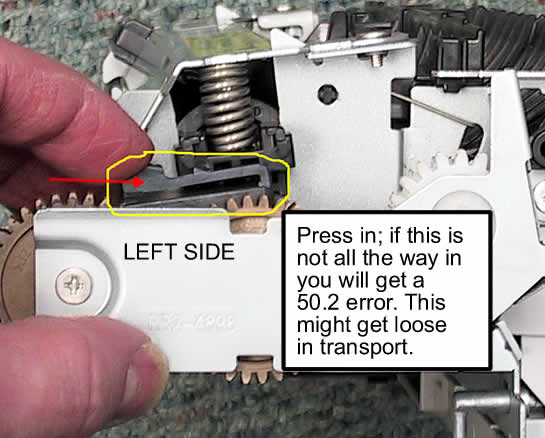
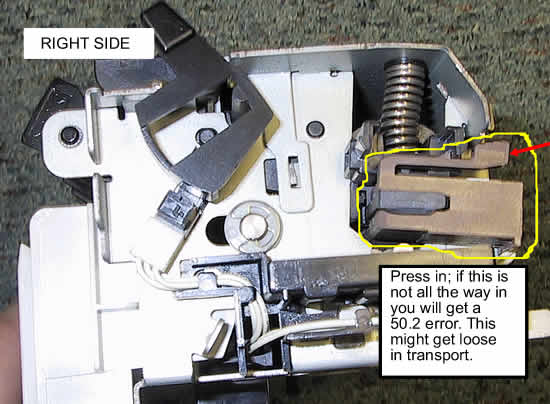
Then flip the fuser over to the right side (the non-gear side) and press in on the other fuser tab to make sure it is also fully clicked in place.
(right side of a LaserJet 4000/4050 fuser pictured below)
(right side of a LaserJet 4100 fuser pictured below)
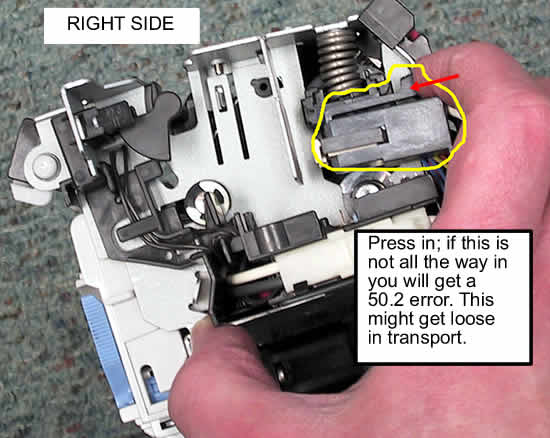
After pressing in on the tabs, re-install the fuser and test. If the '50.2' error continues, replace the fuser.
Tech Support
Featured Articles



