|
 |
HP LaserJet 4200/4240/4300/4250/4350 Maintenance Kit Installation Instructions
|
A picture is worth a thousand words...
It's a lot easier to show somebody how to install a maintenance kit than
to tell them. After talking with hundreds of customers over the phone
about installing printer maintenance kits we decided to write our own
manuals. The instructions we found from Hewlett Packard and other sources
were missing lots of information and often didn't contain any pictures.
So here you are! We hope you find the installation instructions helpful.
A lot of time went into creating them, feel free to email us with your
comments!  |
| |
| What
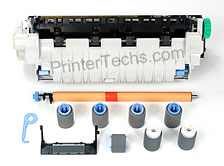
is included in a maintenance kit? |
| |
| Qty. |
Description |
| 1 |
HP LaserJet 4200, 4300, or 4250/4350 fuser |
| 1 |
Transfer roller |
| 6 |
Feed/Separation rollers |
| 1 |
Tray 1 (Multi-purpose tray) pick-up roller |
| PrinterTechs exclusive parts... |
| 2 |
Trays 2 & 3 pickup rollers |
| 1 |
Tray 1 (Multi-purpose tray) separation pad OEM
|
| |
Description |
Qty in kit |
 |
HP LaserJet 4200, 4300, or 4250/4350/4240 fuser |
1 |
 |
Transfer roller -- click image to enlarge |
1 |
 |
Feed/Separation rollers |
6 |
 |
Tray 1 (Multi-purpose tray) pick-up roller |
1 |
PrinterTechs bonus parts
|
 |
Trays 2 & 3 Pick-up rollers |
2 |
 |
Tray 1 (Multi-purpose tray) separation pad
Most companies, including Hewlett Packard, do not include this part,
but they should. |
1 |
|