



Laser printer print defects - Creases
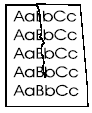
| Problem | Possible Cause | Solution |
|---|---|---|
| creases |
Paper is loaded incorrectly. |
Make sure print media is loaded into tray correctly, and that the tray guides are adjusted properly to fit against the paper stack. |
| creases |
Determine the cause by performing a half-way test to isolate the defective component. |
Replace defective component. Common possibilities include slipping paper pickup assembly, slipping feed assembly, slipping fuser assembly. |
Tech Support
Featured Articles



